Wire up Ollama to LiteLLM and Qdrant for local RAG: ingestion, chunking, embeddings, retrieval, and basic evaluation.
[Read More]
Local AI Development with Ollama and .NET
Learn how to run large language models locally using Ollama and integrate them into your .NET applications for enhanced privacy, reduced costs, and offline AI capabilities.
[Read More]
Modernizing Legacy ASP.NET Projects in 2025
Practical strategies for assessing and modernizing legacy ASP.NET projects, from incremental migration to adopting modern patterns.
[Read More]
Quality & Delivery: Testing, Security, Performance, and CI in Mes Recettes
Testing status, security roadmap, performance strategy, and CI/CD blueprint.
[Read More]
Inside the Architecture: Patterns, Data Modeling, and Extensibility in Mes Recettes
Clean layering, model mapping, deferred abstractions, and growth paths.
[Read More]
Mes Recettes: Building a Modern Recipe Index with Blazor WebAssembly & Supabase
Why Blazor + Supabase, architecture highlights, what’s built vs planned, and early lessons.
[Read More]
Supabase and Table Relationships
For one of my .NET projects, I use Supabase to store my data. Supabase is an open-source alternative to Firebase. It is based on PostgreSQL and provides a REST API and websockets to interact with the database.
To connect my .NET project to Supabase, I use Supabase Sharp and you can also find the documentation on the official Supabase website.
The ease of use of the library is really interesting and it also allows me to use the Supabase website directly to manage my data without having to write code to do it in my own applications.
[Read More]Blazor 8
Exciting New Features in C# and Blazor 8
The world of .NET web development is constantly evolving, and the latest version of Blazor 8 brings a host of new features and improvements that deserve our full attention. In this article, we will explore the key features of Blazor 8 and how they can enhance your C# projects.
Blazor 8: A Richer and More Interactive User Experience
Blazor 8 continues to push the boundaries of what’s possible with .NET web applications. With improved support for server-side rendering and client-side interactivity, Blazor 8 offers a richer and more responsive user experience.
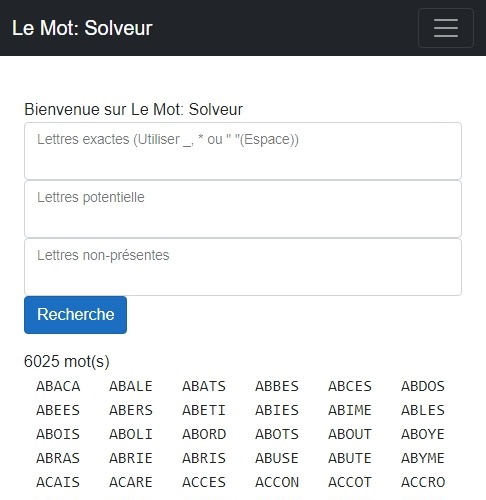
[Read More]Le Mot: Solveur
I created a small utility to help solve Le Mot (source), a game using the same concept as Wordle, but in French, created by @louanben.
The utility allows filtering a list of words through exact letters, potential letters, and non-present letters. Find Le mot: Solveur directly on my site.
Mattermost Stream Deck plugin
 In my previous article (In French only), I discussed how to create a C# plugin for Stream Deck. Here I present a plugin for Stream Deck for Mattermost developed in C# and .Net 6.
The project is separated in two parts:
- A client for Mattermost: Allows connection to Mattermost server and provides objects for interaction with it.
- A Stream Deck plugin: Actions for Stream Deck, deployed in the Elgato store.
Currently, the plugin only contains one action:
[Read More]Posts