Structured Outputs with Ollama and .NET

Part 6 in the “Local AI with Ollama and .NET” series: Part 1 – Ollama and .NET | Part 2 – Local RAG | Part 3 – AI Agents | Part 3.5 – MCP Server | Part 4 – Microsoft Agent Framework | Part 5 – Aspire | Version française

Asking a local model to reply in JSON directly in the prompt works most of the time. The problem is the rest of the time: the parsing blows up, and rarely at a good moment. Here’s a simple trick to get reliable JSON with Ollama and .NET.

[Read More]
C# and JSON

If you need to use data formatted with the JSON standard, here is a simple trick to get started (but you can complicate it as you wish ;)). I use the Web Essentials extension and the NuGet package Json.NET. The JSON data file I use is this one: Example JSON File (source).

Here are the steps to take the JSON data, generate the necessary classes, download the data, and populate these new classes:

  • Install the Web Essentials extension
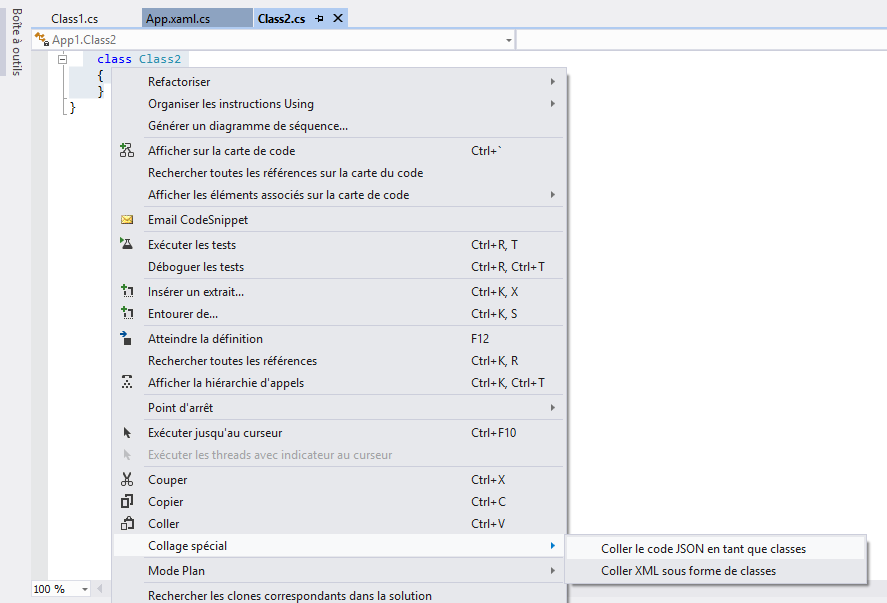
  • Create a new class file
  • Put a snippet or the entire JSON data into the clipboard (Copy or CTRL-C)
  • Right-click in the editor or go to the EDIT menu/Special Paste and select “Paste JSON as Classes”

image

[Read More]