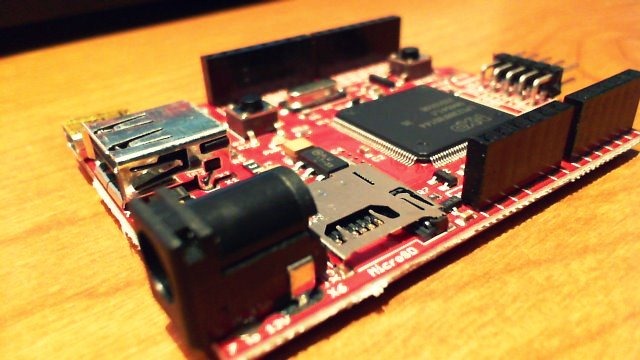
Pyxis 2–An OS for the .Net Micro Framework

Pyxis 2 is an OS running on the .Net Micro Framework (NETMF). It can theoretically run on any NETMF platform, but it is currently configured only for GHI Electronics (Tinyclr.com) products.

To learn more, read the NETMF team blog or visit the official site. The code is available as open source at pyxis2.codeplex.com. Here is a video to whet your appetite:

Pyxis 2 Beta Released!

Reference Documentation

In the November edition of MSDN Magazine, Peter Gruenbaum explains how to write good reference documentation for APIs in his article titled “A Coder’s Guide to Writing API Documentation”.

My attention was particularly drawn to Figures 2 and 3, which explain how to comment while maintaining consistency throughout the API. I have reproduced them here:

Figure 2: Reference Documentation Style

TypeGuidelineExamples
ClassStart with a word like “Represents”“Represents a user’s photo album.”
Methods and functionsStart with a verb“Returns the number of contacts for the specified area.”

“Pauses the video.”
PropertiesUse a noun or start with verbs such as “Gets” or “Gets and sets”“The user’s tasks.”

“Gets and sets a collection of the user’s tasks.”
EventsStart with a phrase such as “Raised when” or “Occurs when”“Raised when the response from server is received.”
XML elementsUse a noun-based phrase“The city’s postal code.”
Boolean valuesFor Boolean properties, start with “Indicates whether”; for Boolean return values on methods and functions, start with “Returns whether”“Indicates whether the control is visible.”

“Returns whether two regions intersect.”

Figure 3: Reference Documentation Example

[Read More]

Back from Nepal

After 4 weeks of vacation, I am now back home. It must be said that it is not necessarily a restful vacation to go to the other side of the world and reach the foot of the highest peak in the world!

4 weeks without contact with a computer (ok ok, 2 minutes to say that we were still alive), it feels rather strange! And did you know that all along the climb to the Everest base camp they have installed cell towers? So it’s not surprising to come across a Sherpa in full conversation with his mobile phone!

[Read More]

[VS2010 Tips] Multi-line Insertion

While reading the MSDN article on converting VBA applications to C# 4.0, I remembered the famous ALT+[Selection] function that allows you to insert the same text/code on multiple lines at once. So, here is the English version of that part of the article:

Press ALT and select where you want to insert your code (selection in light blue in the image below):
image
Type your code and boom! All the selected lines have been filled with your code:

[Read More]