dotnet watch: you use it for hot reload. You should do more with it.

Every time I changed code, I’d Alt-Tab to the terminal, arrow up, Enter. dotnet test. Wait. Check. Back to the editor. Repeat.

It’s not the end of the world. But over a full day, it adds up, mostly in lost focus. The annoying part is that I already had dotnet watch in my workflow for hot-reloading a web app. I just never thought to ask what else it could do.
[Read More]
Categories: .NET  Tools  C#  Tags: .NET  C#  dotnet watch  Tests  xUnit  Productivity 

Supabase and Table Relationships

For one of my .NET projects, I use Supabase to store my data. Supabase is an open-source alternative to Firebase. It is based on PostgreSQL and provides a REST API and websockets to interact with the database.

To connect my .NET project to Supabase, I use Supabase Sharp and you can also find the documentation on the official Supabase website.

The ease of use of the library is really interesting and it also allows me to use the Supabase website directly to manage my data without having to write code to do it in my own applications.

[Read More]
Categories: .NET  C#  Supabase  AI  Tags: .NET  C#  Supabase  AI 

Blazor 8

Exciting New Features in C# and Blazor 8

The world of .NET web development is constantly evolving, and the latest version of Blazor 8 brings a host of new features and improvements that deserve our full attention. In this article, we will explore the key features of Blazor 8 and how they can enhance your C# projects.

Blazor 8: A Richer and More Interactive User Experience

Blazor 8 continues to push the boundaries of what’s possible with .NET web applications. With improved support for server-side rendering and client-side interactivity, Blazor 8 offers a richer and more responsive user experience.

[Read More]
Categories: .NET  C#  Blazor  IA  Tags: .NET  C#  Blazor  IA  Microsoft  Blazor 8  C# 12 

C# and JSON

If you need to use data formatted with the JSON standard, here is a simple trick to get started (but you can complicate it as you wish ;)). I use the Web Essentials extension and the NuGet package Json.NET. The JSON data file I use is this one: Example JSON File (source).

Here are the steps to take the JSON data, generate the necessary classes, download the data, and populate these new classes:

  • Install the Web Essentials extension
  • Create a new class file
  • Put a snippet or the entire JSON data into the clipboard (Copy or CTRL-C)
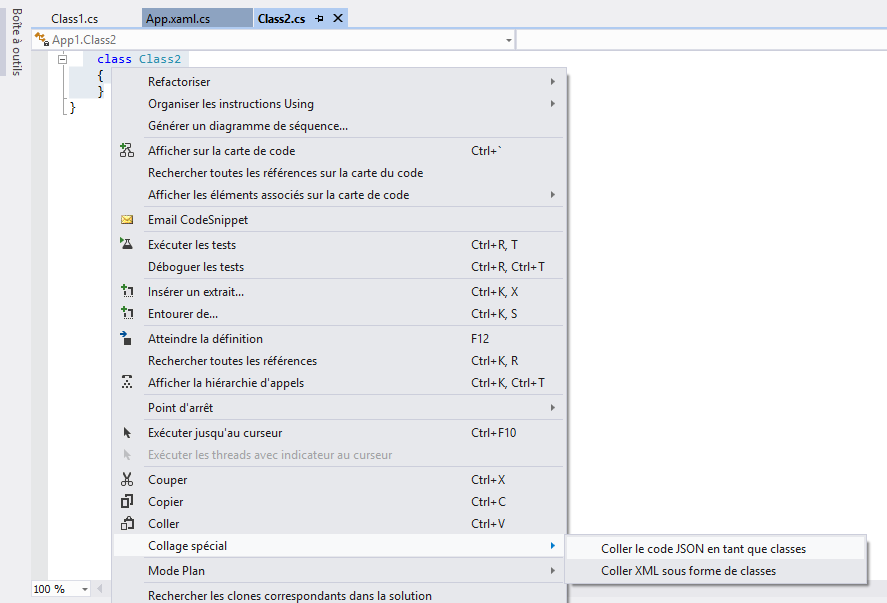
  • Right-click in the editor or go to the EDIT menu/Special Paste and select “Paste JSON as Classes”

image

[Read More]
Categories: .NET  C#  Tags: JSON  NuGet  Json.NET  Web Essentials  C#  Data 

Privacy Policy for Windows Store

I was aware of the requirement for a privacy policy for the Windows Store (requirement 4.1.1), but when publishing my application it was rejected on the grounds that I absolutely had to provide this policy because I was using the Internet connection. So even if you do not collect information from your users, simply being connected requires this policy. It is unfortunate that Visual Studio validation does not detect this issue and that it is detected later during submission.

[Read More]
Categories: .NET  C#  General  Tags: Windows 8  Windows Store  Privacy  Charm 

Patiner on the Windows Store

After creating a similar app on Windows Phone, I had fun making a similar app on Windows 8: Patiner.

The app allows you to view the status of the ice rinks on the island of Montreal by navigating the map. It’s very simple and that’s intentional, but improvements are already planned for future versions.

The data comes from Patiner Montreal, which offers an excellent web portal and links to apps for other operating systems.

[Read More]

Create your first Azure Mobile Services application

It is very easy to create your first Windows 8, Windows Phone 8 or iOS application with Azure Mobile Services tools. In this post, I will demonstrate how to create a sample “ToDo” application. In fact, it will take you longer to read this post than to execute the steps in it!

Log in to your Windows Azure portal and go to the Mobile Services section. Click on the Create a mobile service link.

[Read More]

Visual Studio 11: Caller Attributes

One of the new features of Visual Studio 11 and the .NET Framework 4.5 are the Caller attributes:

  • CallerMemberName: allows you to obtain the method or property name of the caller to the method.
  • CallerFilePath: allows you to obtain the full path of the source file that contains the caller. This is the file path at compile time.
  • CallerLineNumber: allows you to obtain the line number in the source file at which the method is called.

These attributes help to simplify the code in certain scenarios, such as logging or when using the INotifyPropertyChanged interface (as in MVVM) and you need to pass the name of the calling property.

[Read More]
Categories: .NET  C#  Tags: Visual Studio  Visual Studio 11  VS11  Caller  Attributes  logging  MVVM  C# 

WP7 App: InterUrbain

MarketPlace_99x99

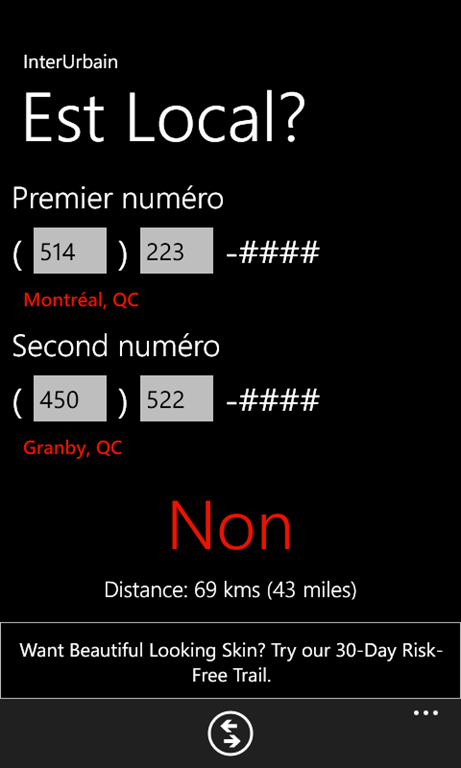
Here is a second application of my own creation: InterUrbain.

This utility application allows you to determine if calls between two phone numbers are local or long-distance. Simply enter the area code and the first three digits of the number to determine their distances. Simple, effective, and most importantly free!

SplashScreenPreCheck.frPostCheck.fr,png

If you have any suggestions, comments, or need support, do not hesitate to contact me (see the link at the top of this page).

[Read More]
Categories: .NET  Mobile  C#  General  Tags: Windows Phone  WP7  InterUrbain 

Advertisements for Windows Phone 7

When developing applications, we always want to make our investment profitable and maybe even make a little profit. With Windows Phone 7 (WP7) there are 2 methods to generate revenue: app purchase and ad display. This article focuses on the second method.

Creating a pubCenter account

First, you need to create an account on the Microsoft Advertising pubCenter. pubCenter is the hub for WP7 ads and Windows 8 apps. Very simple and easy to use, so I will omit the account creation details in this article.

[Read More]
Categories: .NET  C#  Mobile  Tags: Windows Phone  WP7  Microsoft  pubCenter  Advertising